Quick Fix my Program is a button in QuickBooks Tool Hub that Intuit uses as an early step for crashes, freezes and failed updates. According to Intuit, it shuts down any background processes QuickBooks might be using, then runs a quick repair on the program. It works on the program, not on your company file, and it is worth running before you try anything heavier.
Quick answer
Close QuickBooks, install the latest Tool Hub from Intuit, open it and choose Program Problems, then Quick Fix my Program. When it finishes, reopen QuickBooks and your company file, and download any updates again. If the problem comes back, move on to the Install Diagnostic Tool, and then to a clean install.
What Quick Fix my Program does
QuickBooks runs several background processes, and a stuck one can block the program from opening or finishing an update. The tool closes those processes, then runs a quick repair. It is the lightest tool in Tool Hub, which is why Intuit lists it before the Install Diagnostic Tool and before reinstalling.
It doesn’t repair a damaged company file and it doesn’t fix network connections. Use File Doctor for the file and Database Server Manager for the network.
When to use it
Intuit’s articles call for it in these cases, and the Intuit team recommended it in the community threads we read:
- QuickBooks keeps crashing, or takes many tries to open or sign in. An Intuit team member gave this fix to a QuickBooks Enterprise 2024 user in October 2024, and the poster reported that it “seems to have worked.”
- QuickBooks won’t open at all, or shows “QuickBooks has stopped working.”
- A software or payroll update stops with a 15xxx code. Intuit’s article on these errors, such as error 15101, makes it Solution 2.
- A payroll update stops with error PS033.
Intuit’s staff listed these possible causes for the crashing: a long company name, a damaged or missing QBWUSER.INI file, drive corruption, damaged program files and a damaged Windows setup. Quick Fix my Program targets the program-file side of that list.
How to run Quick Fix my Program
- Close QuickBooks Desktop.
- Download the latest QuickBooks Tool Hub from Intuit and install it. Intuit’s current articles name version 1.6.0.8 and recommend Windows 11 (64-bit). Our Tool Hub guide has the install steps.
- Open Tool Hub from its desktop icon and choose Program Problems.
- Choose Quick Fix my Program and let it finish. Don’t open QuickBooks while it runs.
- Open QuickBooks and your company file.
- Download the latest QuickBooks update, and the latest payroll tax table update if you use payroll.
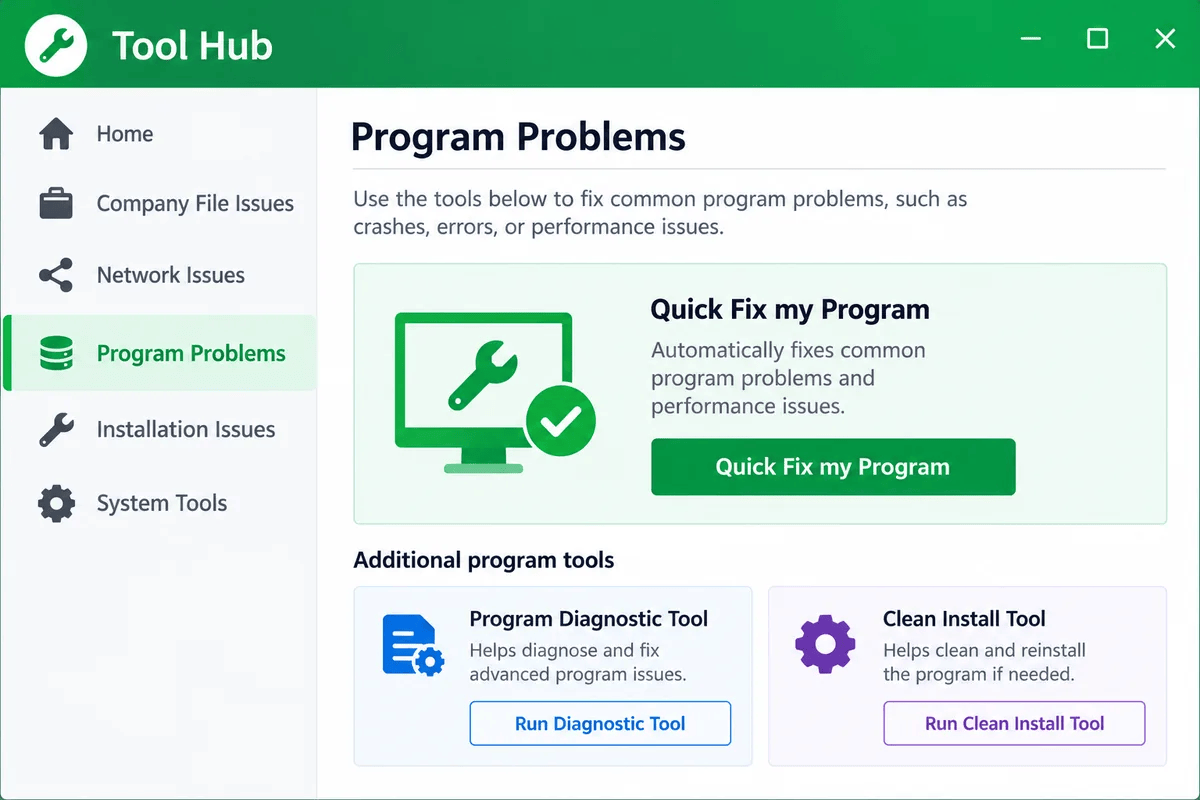
Intuit’s general Tool Hub article doesn’t name this button, but its 15xxx update article and its “QuickBooks has stopped working” article both do, and the paths match. Tool Hub changes between releases. If you don’t see the button, update Tool Hub and look again.
Quick Fix my File or Quick Fix my Program
Tool Hub has two buttons with almost the same name. People mix them up, and one community thread shows it.
| Quick Fix my File | Quick Fix my Program | |
|---|---|---|
| Tab | Company File Issues | Program Problems |
| Fixes | Company file and File Doctor prompts | QuickBooks crashes, freezes, update errors |
| Try it when | QuickBooks keeps asking you to download File Doctor, or a file won’t open | QuickBooks won’t open, or an update stops partway |
| Next step if it fails | File Doctor, Check your file | Install Diagnostic Tool, then clean install |
If Quick Fix my Program doesn’t work
Work down this list. Each step is heavier than the one before.
Step 1: Run the Install Diagnostic Tool
- Open Tool Hub and choose Installation Issues, then the QuickBooks Install Diagnostic Tool.
- Let it run. Intuit’s staff say it can take up to 20 minutes.
- Restart the computer, then open QuickBooks.
One Intuit article names a “QuickBooks Program Diagnostic Tool” on the Program Problems tab for the same job. Use whichever your Tool Hub shows.
Step 2: Rename QBWUSER.ini
- Close QuickBooks. In File Explorer, show hidden folders and go to
C:\Users\[your user name]\AppData\Local\Intuit\QuickBooks [year]. - Rename
QBWUSER.initoQBWUSER.ini.old. Intuit’s article also says to renameEntitlementDataStore.ecml. - Reopen QuickBooks.
This clears your list of recently opened company files, so you will need to browse to yours the first time.
Step 3: Reset the update (for 15xxx update errors only)
If a 15xxx error continues after Quick Fix my Program, Intuit’s steps are: close QuickBooks, delete the Components folder under the Intuit folder in ProgramData for your version, reopen QuickBooks, choose Help, then Update QuickBooks Desktop, and click Update Now with Reset Update ticked. Restart, then run Update Now again.
Deleting a folder is a bigger step. Make a copy of the folder first, and use this step only for update errors.
Step 4: Clean install
A clean install removes the old program folders and reinstalls QuickBooks. Your company files stay where they are, but copy them somewhere safe first.
Still stuck?
If QuickBooks still won’t open after the clean install, the problem may be Windows itself, a drive error or security software. Send us your QuickBooks version, Windows version and the exact message.
Ask a bookkeeper to take a lookWhy QuickBooks crashes and what Intuit’s team says
The causes Intuit’s team lists are the same across threads from 2020 to 2024. Match yours:
| Cause | What you see | Fix |
|---|---|---|
| Damaged program files | Crashes after an update, won’t open | Quick Fix my Program, then Install Diagnostic Tool |
| Damaged or missing QBWUSER.INI | Odd start-up behavior, blank windows | Rename the file (Step 2) |
| Long company name | Crashes when the file opens | Shorten the company name in Company Information, then reopen |
| Drive corruption or a damaged Windows setup | Crashes in several programs | Check the drive in Windows, then talk to your IT person |
The long company name cause comes from Intuit staff’s list in the community threads. Shortening the name is our suggestion, not an Intuit step, and it only works once the file opens. If the file won’t open at all, use File Doctor first.
Related: How to Move QuickBooks to a New Computer.
Questions people ask
Does anyone else’s QuickBooks keep crashing after an update? Sometimes it takes 20 to 30 tries to log in.
An Intuit team member recommended running Quick Fix my Program from Program Problems, then reopening the data file. The poster, on QuickBooks Enterprise 2024, wrote that it seemed to have worked and they got in on the first try.
When I click Help, the window stays empty with no interaction. Can I fix it?
In 2020 a community member suggested Quick Fix my Program and the Install Diagnostic Tool. An Intuit team member called it a known issue under investigation and gave a manual workaround. No confirmed fix appears in that thread, so on a current version run Quick Fix my Program first.
In two days QuickBooks will not open for me at all. What do I do?
A community reply gave this order: Quick Fix my Program, then the Install Diagnostic Tool (about 20 minutes, then restart), then a repair or clean install. The poster didn’t say which step worked, so back up your file and go in that order.
Everything in Tool Hub works except the Program Diagnostic Tool. It says the contents of this file cannot be unpacked.
Replies suggested reinstalling QuickBooks, on the workstation only if QuickBooks runs on a server. Nobody confirmed it fixed the error. Intuit’s own tip is to download Tool Hub again with a different browser.
These questions are adapted from public Intuit Community threads: Quickbooks Enterprise 2024 keeps crashing (October 2024); QB HELP stopped working (March 2020); In 2 days QB will not open (March 2020); QB Tool Hub problem (December 2024). Threads can be edited or removed. The answers are short and based on Intuit’s own documentation, and we say so when a step comes from other community members.
Sources
Steps checked against Intuit’s documentation in October 2026. Intuit changes its articles, so confirm any step that looks different on your screen.
Quick Fix Bookkeepers is independent and not affiliated with Intuit. QuickBooks and Tool Hub are trademarks of Intuit Inc. Always back up your data before following repair steps.